Codex
Memory
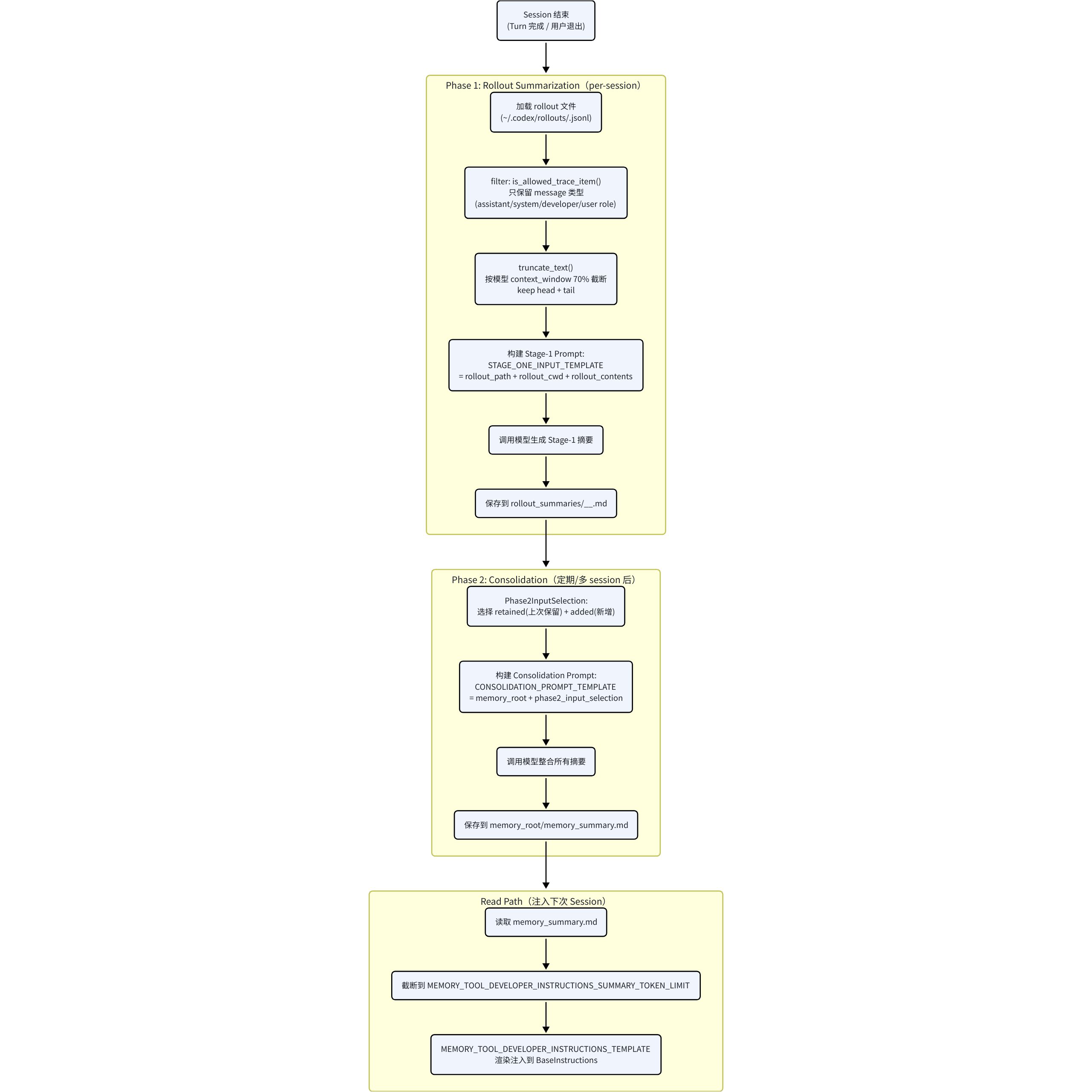
Stage One
- Input
- Base Instructions: core/templates/memories/stage_one_system.md
- User message: core/templates/memories/stage_one_input.md (需要输入rollout_path, rollout_cwd, 被过滤和截断后的rollout_contents)
- Output
- raw_memory:是一个“可检索、可归类、可供Stage Two consolidation再加工”的结构化记忆
- rollout_summary:把rollout提炼成未来agent通常不用再回看原始rollout也能理解的信息,保留足够多证据和推理脉络,让未来agent能“复现这次工作是怎么走到结论的”
- rollout_slug:给rollout_summary文件命名用的描述性slug
这三个输出会以数据库落表的形式写到本地的~/.codex/state_
.sqlite里面
- 触发时机:每次新启动一个session
Stage Two
- step1: 先拿去多条命中的Stage One 输出:(raw_memory, rollout_summary, rollout_slug)
- step2:把所有的raw_memory合并成一个raw_memories.md文件;每条rollout_summary被写成一个单独的文件rollout_summaries/
.md
|
|
- step3:启动一个专门consolidation agent。cwd在~/.codex/memories/,然后给它一个prompt:core/templates/memories/consolidation.md,这段prompt告诉它:
- 主要先看raw_memories.md;
- 必要时看rollout_summaries/*.md;
- 如果已经有旧的MEMORY.md / memory_summary.md / skills/*,要做增量更新,不是重新写;
- 不要打开原始rollout transcript 最终,这个prompt输出三个高层产物:
- MEMORY.md:主记忆库
- memory_summary.md:一个更短的摘要,这部分后续直接注入主agent的developer msg
- skills/*:可选,如果consolication发现某类流程足够稳定,可以沉淀成skill(memories下面的skill不会在上下文初始化时作为developer msg加载在上下文中)
- 触发时机:当Stage One触发后且有新生成的memory时,会立即触发Stage Two
Memory注入Context
- memory_summary.md截断到一个token上限,并以developer消息添加
Compact
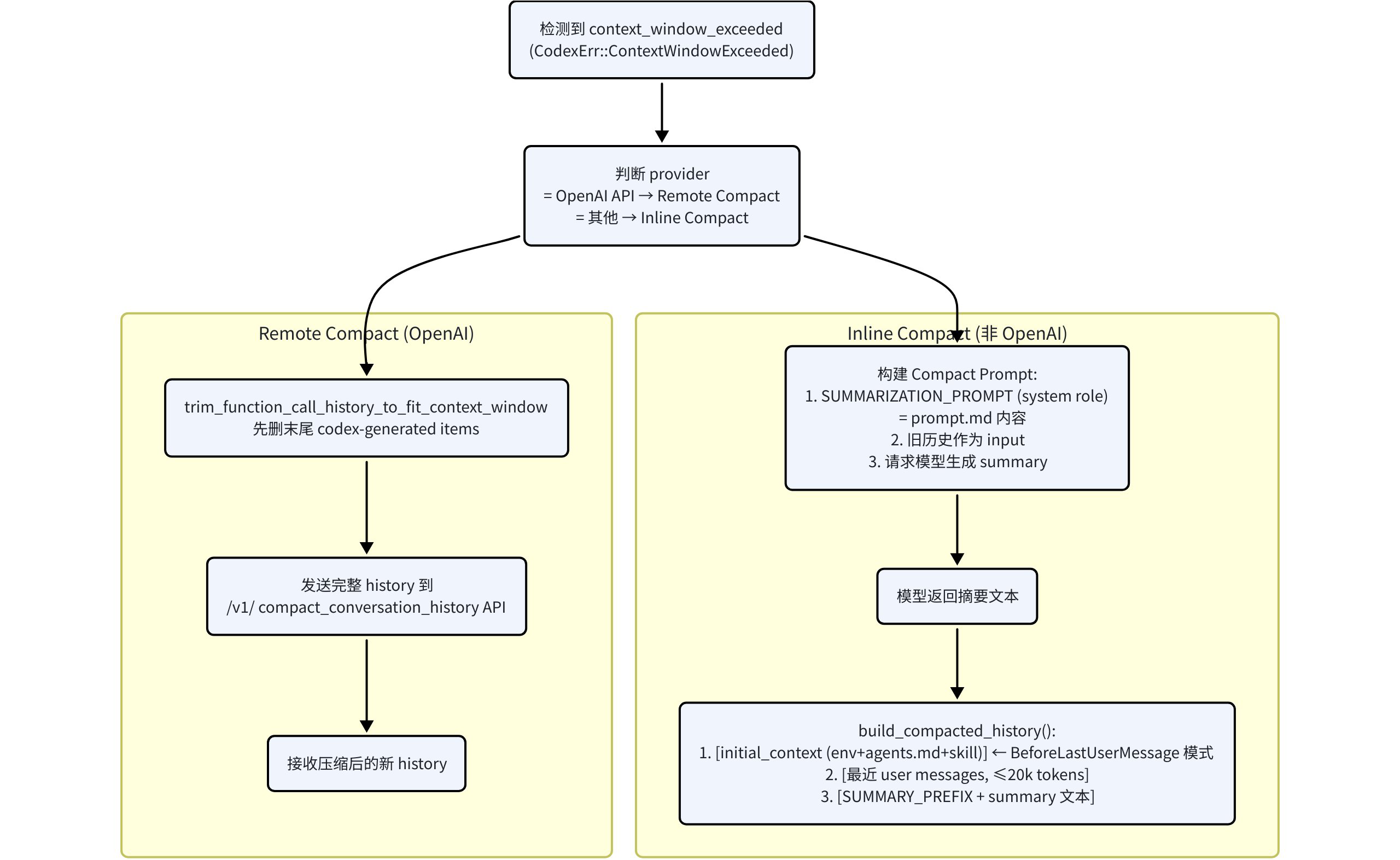
重点关注Inline Compact
触发时机
- 手动触发,用户执行/compact,Codex会直接合成一条user input,插入上下文末尾,内容为
- 自动触发,pre-turn compact: 每次正常user turn开始前,如果当前累计token超过auto_compact_limit,先compact
- 自动触发,mid-turn compact:模型在turn中,token到阈值,会在turn中间先compact。通常发生在tool call/tool output后还需要继续推理的时候
- 特殊情况:模型切换到更小context window,Codex会先用上一个模型做一次compact,再切换到新模型继续
- Compact prompt:core/templates/compact/prompt.md
|
|
压缩过程
- Codex先clone当前history,再把compact prompt作为一条新user msg追加进去,发给模型
- Codex输出这个compact turn的最后一条assistant message文本,当成摘要正文
- Codex包装成:summary_text = SMMARY_PREFIX + “\n” + assistant_summary;其中SUMMARY_PREFIX大致含义:“前一个模型已经做过总结,你现在基于这个总结继续,不要重复劳动”;prompt在core/templates/compact/summary_prefix.md
- 压缩后的上下文怎么变化?重写后的history主要由两个部分组成
- 保留一部分真实 user messages,从后往前保留,最多约20k tokens
- 追加一条“summary user message”,内容是 SUMMARY_PREFIX + “\n” + summary_content,注意这条消息也是user message
注意:在上下文compact之后,需要重新构建完整的上下文,构建的顺序是:
1 2 3 4 5 6 7 8 9 10 11 12 13 14 15 16instructions = base_instructions input = [ ## compact后的消息(包含最近20k长度的user message和role=user的summary message) user(最近保留的历史 user message 1), user(最近保留的历史 user message 2), ..., user(summary message), ## 正常加载必要developer和contextual user 消息 developer(full initial context bundle), user(contextual user bundle: AGENTS / environment_context), ## 当前轮消息 user(当前轮新消息) ]
调度层面
- 手动compact:异步,单开一个compact turn
- 自动compact:同步,压缩完再继续后续采样
Context Manager
- session初始化时的上下文组装:
|
|
- Codex脚手架设计:
| 内容 | 消息角色 | 脚手架 tag | 条件 / 说明 |
|---|---|---|---|
| 模型切换通知 | developer | <model_switch> |
仅当模型在轮次间发生变化 |
| DeveloperInstructions(沙箱策略 + 审批策略) | developer | <permissions instructions> |
始终注入 |
| 自定义 developer_instructions | developer | 无固定 tag,常为纯文本 | 若配置了自定义指令 |
| Memory Tool 开发者指令 | developer | 无固定 tag,常为纯文本 | 若启用记忆工具且有可注入摘要 |
| 协作模式指令 | developer | <collaboration_mode> |
若当前 mode 对应 developer instructions 非空 |
| 实时对话指令 | developer | <realtime_conversation> |
若处于 realtime 模式,或从 realtime 退出时需要重申 |
| 人格规范 | developer | <personality_spec> |
若设置了人格,且该人格指令未 baked 进 base instructions |
| Apps 区段 | developer | <apps_instructions> |
若有可访问且启用的应用 / connectors |
| Skills 区段(会话级 skills 摘要) | developer | <skills_instructions> |
若当前 session 加载了可用 skills |
| Plugins 区段 | developer | <plugins_instructions> |
若有插件 |
| Git commit 归属 | developer | 无固定 tag,纯文本 | 若配置了 commit attribution |
| 项目 / 仓库说明(AGENTS.md、project doc、额外 user instructions) | user | 外层标题 # AGENTS.md instructions for ... + 内层 <INSTRUCTIONS> |
首轮 full context 注入时常见;属于 contextual user message,不是普通用户请求 |
| EnvironmentContext | user | <environment_context> |
首轮 full context 注入;后续若环境变化则按 diff 再注入 |
| 显式 skill 注入(某个 SKILL.md 正文) | user | <skill> |
用户显式提到某个 skill,或命中 skill 触发规则时注入;这是 contextual user message,不是 developer message |
| 远程图片附件包裹 | user | <image> … </image> |
用户消息携带远程图片时出现;用于给 InputImage 做边界标记;它是普通 user message 的一部分,不属于 contextual scaffold |
| 本地图片附件包裹 | user | <image name="[Image #n]"> … </image> |
用户消息携带本地图片时出现;同样是普通 user message 的一部分,不属于 contextual scaffold |
| 用户 shell 命令通知 | user | <user_shell_command> |
某些 UI / harness 场景下,把用户执行的 shell 命令作为特殊 user 片段注入 |
| 轮次中断标记 | user | <turn_aborted> |
中断当前 turn 或 fork / rollback 需要显式标记中断边界时注入 |
| 子代理通知 | user | <subagent_notification> |
多代理 / 层级代理运行时,把子代理状态或结果作为特殊 user 片段注入 |
| Plan 模式正式计划输出 | assistant | <proposed_plan> |
仅 Plan mode;这是 assistant 输出,不属于 developer / user 输入上下文 |
| Review 等结构化用户动作 | user | <user_action> |
review 流程等会把结构化动作块写回 history;属于特殊 user 片段 |
Skill
-
插入上下文最开始的 developer msg:
1 2 3 4 5 6 7 8 9 10 11 12 13 14<skills_instructions> ## Skills A skill is ... ### Available skills - name1: description1 (file: /abs/path/.../SKILL.md) - name2: description2 (file: /abs/path/.../SKILL.md) ... ### How to use skills - Discovery: ... - Trigger rules: ... - Missing/blocked: ... ... </skills_instructions> -
如果用户发起turn前显示@某一个skill,那么会在上下文追加一个user msg(直接把这个skill.md放在上下文中)
1 2 3 4 5 6 7 8<skill> <name>lark-wiki</name> <path>/Users/bytedance/.agents/skills/lark-wiki/SKILL.md</path> --- description: ... --- [正文...] </skill>
底层模型接口
codex的模型接口不是client.chat.completions.create(),用的是client.response.create(),目前doubao2.0和该接口对齐,但是目前doubao2.0还未开放训练
|
|
codex目前client.response.create()的顶层request schema:
|
|
其中input为主要输入字段,相当于之前接口的messages字段
-
input[].type,为第一层分类,包含如下枚举值:
1 2 3 4 5 6 7 8 9 10 11 12 13 14message reasoning local_shell_call function_call tool_search_call function_call_output custom_tool_call custom_tool_call_output tool_search_output web_search_call image_generation_call ghost_snapshot compaction other- 其中常见的有:message,function_call, function_call_output, custom_tool_call, custom_tool_call_output
- 其中function_call和custom_tool_call的区别在于(输入格式不同,前者输入为格式化JSON字符串,后者为自由字符串)
- function_call: 结构化JSON参数工具 (Codex中的shell, exec_command, view_image, spawn_agent, MCP tool等)
- custom_tool_call:自由格式字符串输入工具 (Codex中的apply_batch)
-
input[].type = message的格式:
1 2 3 4 5 6 7 8 9 10{ "type": "message", "role": "developer|user|assistant", "content": [ ContentItem, ContentItem ], "end_turn": true, "phase": "commentary|final_answer" }-
字段说明:
- type:墓顶枚举 message
- role:develop|user|assistant
- content:是一个数组,每个元素为ContentItem,其中ContentItem包含type字段,枚举值:input_text | input_image | output_text 所以常见message内容如下:
1 2 3 4 5 6 7{ "type": "message", "role": "user", "content": [ {"type": "input_text", "text": "你好"} ] }1 2 3 4 5 6 7 8{ "type": "message", "role": "developer", "content": [ {"type": "input_text", "text": "<permissions instructions>...</permissions instructions>"}, {"type": "input_text", "text": "<skills_instructions>...</skills_instructions>"} ] }1 2 3 4 5 6 7 8{ "type": "message", "role": "assistant", "content": [ {"type": "output_text", "text": "我先看一下代码结构。"} ], "phase": "commentary" }
-
-
input[].type = function_call的格式
1 2 3 4 5 6 7{ "type": "function_call", "name": "shell", "namespace": null, "arguments": "{\"command\":\"ls\",\"workdir\":\"/tmp\"}", "call_id": "call_123" }- 字段说明:
- type:固定枚举function_call
- name: 工具名,如shell,exec_command
- namespace: 可选字符串,通常为空
- arguments:JSON字符串,不是对象
- call_id:工具调用ID
- 字段说明:
-
input[].type = function_call_output的格式
- 最简单的形式
1 2 3 4 5{ "type": "function_call_output", "call_id": "call_123", "output": "命令输出文本" }- 但output不一定为string,也可以是结构化content items(针对view_image返回多模态的工具)
1 2 3 4 5 6 7 8{ "type": "function_call_output", "call_id": "call_123", "output": [ {"type": "input_text", "text": "图片分析结果"}, {"type": "input_image", "image_url": "data:...", "detail": "high"} ] }
To Be Continued ……
Claude Code
Memory
长期Memory的整体形态
-
Claude Code没有像Codex那样的
raw_memory -> consolidation -> memory_summary.md两阶段链路。 -
它的长期memory是
文件系统原生实现 :MEMORY.md:索引文件,只放pointer,不放正文。格式大致如下:
1 2 3 4 5- [User Role](user_role.md) - User is a staff engineer working on platform reliability - [Review Style](feedback_review_style.md) - Prefers findings-first code reviews ordered by severity - [Release Freeze](project_release_freeze.md) - Only critical fixes allowed until April 20, 2026 - [Linear Board](reference_linear_board.md) - Linear project board for backend incident tracking ...more...*.md topic files:真正的memory内容,每条memory一个文件。(包含user, feedback, project, reference)- User: 记录用户本人的长期信息,比如角色、职责、目标、背景知识、偏好。
- feedback:记录用户对agent工作方式的反馈,比如该怎么做、不该怎么做、什么方式被证明有效
- project:
记录项目里的非代码事实,比如谁负责什么、为什么这样做、时间节点、业务背景、这些信息不能直接从代码或git推出来。 - reference:记录外部信息入口,比如某个文档、系统、面板、数据源在哪里,以及它是做什么的
- 每个topic file都包含frontmatter,格式如下:
1 2 3 4 5 6 7--- name: {{memory name}} description: {{one-line description - used to decide relevance in future conversations, so be specific}} type: {{user, feedback, project, refernece}} --- {{memory content}} -
也就是说,它的长期memory产物直接是:
(每次视情况选择更新已有的[]_xxx.md,或者选择新建一个新的[]_xxx.md,其中*可以代表user, feedback, project, reference中的一种)
|
|
整体链路
-
一轮完整query loop(一个turn)结束后,后台触发一次
extractMemories。 -
提取agent只看“自上次提取以来新增的user / assistant消息”。
-
先扫描当前已有memory文件,生成manifest,避免重复写。
- 这里会扫描memory/目录下面除了MEMORY.md文件外的其他所有topic files
每个文件只读取前30行frontmatter,最多读取200个文件,且按最近修改时间倒序排列 - 最终生成的manifest大致格式如下:
1 2 3 4- [feedback] feedback_review_style.md (2026-04-05T07:20:31.000Z): The user wants review feedback ordered by severity with findings first - [project] release_freeze.md (2026-04-04T12:10:09.000Z): Project is under release freeze until April 20, 2026 except for critical fixes - [reference] linear_board.md (2026-04-03T09:02:14.000Z): Linear board for backend incident tracking - [user] user_role.md (2026-04-01T08:15:42.000Z): User is a staff engineer focused on platform reliabilitymanifest的生产是代码自动化拼接的,拼接了原始topic file的 type + file_name + mtime + description(frontmatter)
-
再根据memory taxonomy判断哪些内容值得长期保存。
-
最终直接更新topic file,并同步更新
MEMORY.md。(这里是同一个prompt完成的) -
下次新的session启动时,把
MEMORY.md注入上下文;查询过程中还会再动态检索相关topic files注入。 -
与Codex的核心区别
- Claude Code没有明显的中间态数据库层,也没有长期memory的二阶段consolidation链路。
- Claude Code更像:
每轮结束后,直接做一次增量memory update 。
Memory提取触发时机
- 每轮完整query loop(一个turn)结束后触发一次后台提取。
- 只在主agent触发,不在subagent触发。
- 要求auto-memory已开启。
- remote mode下不跑。
如果本轮主agent已经自己写过memory文件,后台会直接跳过,避免重复写 。- 还有一个turn级节流:
- 默认每个eligible turn都可以跑。
- 也支持配置成“每N个turn才跑一次”。
Memory提取算法
- 核心逻辑:
把最近新增消息 + 当前已有memory manifest + memory类型规则,交给一个受限的forked agent,让它自己决定更新旧memory还是创建新memory 。 - 第一步:维护一个cursor,记录“上次提取已经处理到哪条消息了”。
- 也就是
lastMemoryMessageUuid。 - 每次只看这之后新增的
user / assistant消息。 - 所以这是增量提取,不是每次全量重扫。
- 也就是
- 第二步:提取前先扫描memory目录,生成当前已有memory manifest。
- 最多扫描200个
.md文件。 - 不包括
MEMORY.md。 - 每个文件只读前30行frontmatter。
- 抽出:文件名、修改时间、description、type。
- 再把这份manifest直接喂给提取agent。
- 这份manifest的作用非常关键:
- 让agent知道当前都有哪些memory
- 然后prompt明确要求:优先更新已有memory,不要重复创建duplicate memory。
- 最多扫描200个
- 第三步:Claude Code给长期memory定了一个固定taxonomy,只允许4类:
user, feedback, project, reference。 - 同时明确规定哪些内容不能存:
- code patterns / conventions / architecture / file paths / project structure
- git history / recent changes
- debugging fix recipes
- CLAUDE.md已经有的东西
- 当前会话里的临时任务状态
- 同时明确规定哪些内容不能存:
- 第四步:真正执行提取的是一个forked agent。
- 继承主对话前缀。
- 共享prompt cache。
- 但工具权限被严格限制:
- 允许
Read / Grep / Glob - 允许只读shell
- 只允许在memory目录里
Edit / Write
- 允许
- 第五步:提取prompt明确要求它采用两回合策略:
- turn 1:并行读取所有可能要更新的memory文件。
- turn 2:并行写回所有修改。
- 不要额外调查,不要读代码验证,不要查git。
- 第六步:最终保存方式。
- 每条memory存成一个独立topic file。
再在 MEMORY.md里增加一条pointer。 MEMORY.md只是index,不是正文。
- 第七步:成功后推进cursor(
可以理解成一个指针,指向当前已经提取到的消息uuid )- 如果这次提取成功,cursor前移到当前末尾。
- 如果失败,cursor不动,下次还会重新考虑这段增量消息。
Memory注入Context
- Claude Code不是把所有memory topic files都直接塞进上下文,而是分两层:
MEMORY.md:session初始化时注入。- relevant memories:查询过程中动态检索,再按需注入。
MEMORY.md注入方式:- 启动session时,
MEMORY.md会作为memory entrypoint被加载。 - 但会有截断上限:最多200行、最大约25KB。
- 所以
MEMORY.md被设计成一个短索引,而不是正文仓库。
- 启动session时,
- Relevant memories检索:
- 当用户发起query后,Claude Code会扫描memory文件头部信息。
- 再用一个小模型/side-query,从manifest里挑最多5个最相关的memory文件。
- 然后把这些文件正文作为
relevant_memories attachment注入上下文。 - 也就是说,它的recall不是“全量memory注入”,而是:
MEMORY.md负责全局索引。topic files负责按需召回。
Memory这块所涉及的两个Prompt
-
后台memory extraction prompt :1 2 3 4 5 6 7 8 9 10 11 12 13 14 15 16 17 18 19 20 21 22 23 24 25 26 27 28 29 30 31 32 33 34 35 36 37 38 39 40 41 42 43 44 45 46 47 48 49 50 51 52 53 54 55 56 57 58 59 60 61 62 63 64 65 66 67 68 69 70 71 72 73 74 75 76 77 78 79 80 81 82You are now acting as the memory extraction subagent. Analyze the most recent ~{{newMessageCount}} messages above and use them to update your persistent memory systems. Available tools: Read, Grep, Glob, read-only Bash (ls/find/cat/stat/wc/head/tail and similar), and Edit/Write for paths inside the memory directory only. Bash rm is not permitted. All other tools — MCP, Agent, write-capable Bash, etc — will be denied. You have a limited turn budget. Edit requires a prior Read of the same file, so the efficient strategy is: turn 1 — issue all Read calls in parallel for every file you might update; turn 2 — issue all Write/Edit calls in parallel. Do not interleave reads and writes across multiple turns. You MUST only use content from the last ~{{newMessageCount}} messages to update your persistent memories. Do not waste any turns attempting to investigate or verify that content further — no grepping source files, no reading code to confirm a pattern exists, no git commands. ## Existing memory files {{existingMemories}} Check this list before writing — update an existing file rather than creating a duplicate. If the user explicitly asks you to remember something, save it immediately as whichever type fits best. If they ask you to forget something, find and remove the relevant entry. ## Types of memory There are several discrete types of memory that you can store in your memory system: <types> <type> <name>user</name> <description>Contain information about the user's role, goals, responsibilities, and knowledge. Great user memories help you tailor your future behavior to the user's preferences and perspective. Your goal in reading and writing these memories is to build up an understanding of who the user is and how you can be most helpful to them specifically. For example, you should collaborate with a senior software engineer differently than a student who is coding for the very first time. Keep in mind, that the aim here is to be helpful to the user. Avoid writing memories about the user that could be viewed as a negative judgement or that are not relevant to the work you're trying to accomplish together.</description> <when_to_save>When you learn any details about the user's role, preferences, responsibilities, or knowledge</when_to_save> <how_to_use>When your work should be informed by the user's profile or perspective. For example, if the user is asking you to explain a part of the code, you should answer that question in a way that is tailored to the specific details that they will find most valuable or that helps them build their mental model in relation to domain knowledge they already have.</how_to_use> </type> <type> <name>feedback</name> <description>Guidance the user has given you about how to approach work — both what to avoid and what to keep doing. These are a very important type of memory to read and write as they allow you to remain coherent and responsive to the way you should approach work in the project. Record from failure AND success: if you only save corrections, you will avoid past mistakes but drift away from approaches the user has already validated, and may grow overly cautious.</description> <when_to_save>Any time the user corrects your approach ("no not that", "don't", "stop doing X") OR confirms a non-obvious approach worked ("yes exactly", "perfect, keep doing that", accepting an unusual choice without pushback). Corrections are easy to notice; confirmations are quieter — watch for them. In both cases, save what is applicable to future conversations, especially if surprising or not obvious from the code. Include *why* so you can judge edge cases later.</when_to_save> <how_to_use>Let these memories guide your behavior so that the user does not need to offer the same guidance twice.</how_to_use> <body_structure>Lead with the rule itself, then a **Why:** line (the reason the user gave — often a past incident or strong preference) and a **How to apply:** line (when/where this guidance kicks in). Knowing *why* lets you judge edge cases instead of blindly following the rule.</body_structure> </type> <type> <name>project</name> <description>Information that you learn about ongoing work, goals, initiatives, bugs, or incidents within the project that is not otherwise derivable from the code or git history. Project memories help you understand the broader context and motivation behind the work the user is doing within this working directory.</description> <when_to_save>When you learn who is doing what, why, or by when. These states change relatively quickly so try to keep your understanding of this up to date. Always convert relative dates in user messages to absolute dates when saving (e.g., "Thursday" → "2026-03-05"), so the memory remains interpretable after time passes.</when_to_save> <how_to_use>Use these memories to more fully understand the details and nuance behind the user's request and make better informed suggestions.</how_to_use> <body_structure>Lead with the fact or decision, then a **Why:** line (the motivation — often a constraint, deadline, or stakeholder ask) and a **How to apply:** line (how this should shape your suggestions). Project memories decay fast, so the why helps future-you judge whether the memory is still load-bearing.</body_structure> </type> <type> <name>reference</name> <description>Stores pointers to where information can be found in external systems. These memories allow you to remember where to look to find up-to-date information outside of the project directory.</description> <when_to_save>When you learn about resources in external systems and their purpose. For example, that bugs are tracked in a specific project in Linear or that feedback can be found in a specific Slack channel.</when_to_save> <how_to_use>When the user references an external system or information that may be in an external system.</how_to_use> </type> </types> ## What NOT to save in memory - Code patterns, conventions, architecture, file paths, or project structure — these can be derived by reading the current project state. - Git history, recent changes, or who-changed-what — `git log` / `git blame` are authoritative. - Debugging solutions or fix recipes — the fix is in the code; the commit message has the context. - Anything already documented in CLAUDE.md files. - Ephemeral task details: in-progress work, temporary state, current conversation context. These exclusions apply even when the user explicitly asks you to save. If they ask you to save a PR list or activity summary, ask what was *surprising* or *non-obvious* about it — that is the part worth keeping. ## How to save memories Saving a memory is a two-step process: **Step 1** — write the memory to its own file (e.g., `user_role.md`, `feedback_testing.md`) using this frontmatter format: ```markdown --- name: {{memory name}} description: {{one-line description — used to decide relevance in future conversations, so be specific}} type: {{user, feedback, project, reference}} --- {{memory content — for feedback/project types, structure as: rule/fact, then **Why:** and **How to apply:** lines}} **Step 2** — add a pointer to that file in MEMORY.md. MEMORY.md is an index, not a memory — each entry should be one line, under ~150 characters: - [Title](file.md) — one-line hook. It has no frontmatter. Never write memory content directly into MEMORY.md. MEMORY.md is always loaded into your system prompt — lines after 200 will be truncated, so keep the index concise Organize memory semantically by topic, not chronologically Update or remove memories that turn out to be wrong or outdated Do not write duplicate memories. First check if there is an existing memory you can update before writing a new one.- 包含两个输入参数:
- existingMemories: 即前面提取的manifest文本
- newMessageCount: 这次允许分析最近新增的大约多少条消息
- 包含两个输入参数:
-
Relevant memories 检索 prompt: 1 2 3 4 5 6You are selecting memories that will be useful to Claude Code as it processes a user's query. You will be given the user's query and a list of available memory files with their filenames and descriptions. Return a list of filenames for the memories that will clearly be useful to Claude Code as it processes the user's query (up to 5). Only include memories that you are certain will be helpful based on their name and description. - If you are unsure if a memory will be useful in processing the user's query, then do not include it in your list. Be selective and discerning. - If there are no memories in the list that would clearly be useful, feel free to return an empty list. - If a list of recently-used tools is provided, do not select memories that are usage reference or API documentation for those tools (Claude Code is already exercising them). DO still select memories containing warnings, gotchas, or known issues about those tools — active use is exactly when those matter.- 在主agent处理当前query的turn消息时,会先触发这个prompt
- 这个prompt会触发一个side query,包含:
- Query: {当前用户输入}
- Available memories: {manifest}。
这里manifest的处理逻辑和extract中一致,但会额外多一个筛选,也就是会过滤掉已经在前几轮(turn)中被选中的memory topic file,避免每轮都重复挑选同样的memory - Recently used tools: {recentTools}
- prompt的输出格式为一个JSON,表示当前query下,需要用到的最相关的至多5个当前的memory topic file
1 2 3{ "selected_memories": ["xxx.md", "xxx.md"] }
一句话总结版
- Claude Code 的长期 memory 是一个“turn-end 增量写入 + turn-start 动态召回”的机制:每轮结束后后台尝试更新 memory,每轮开始时再加载 MEMORY.md 和本轮最相关的 memory topic files。
Compact
压缩类型
-
Microcompact
- 核心目的:主要处理那些特别占上下文,但后续不一定需要完整保留原文的内容。
只会盯一类内容:历史上的tool_result(Read, Shell, Grop, Grob, WebSearch, WebFetch, Edit, Write)。 - 具体方法:
- 第一条路径:Time-based Microcompact(先判断),判断的条件有:
- 这个功能(Microcompact)开关是开的
- 当前请求必须是主线请求,不是字agent
- 历史里至少有一条assistant消息
- 距离上一条assistant消息已经过去很久,默认60分钟
- Time-based Microcompact具体做法:
- 收集整段历史所有可压缩工具返回结果的tool_use id
- 保留最近的N个,默认5个
- 对于之前的tool_result,
把content直接替换为[ Old tool result content cleared]
- 第二条路径:Cached Microcompact(次判断),判断条件有:
- Time-based Microcompact没触发
- Cached microcompact feature开着
- 当前模型支持cache editing
- 当前请求是主线程
- Cached Microcompact具体做法:
- 与Time-based最大的区别:前
者是直接改上下文,后者上下文不改,而是告诉服务端:这些老tool_ result再prompt cache里可以删掉 - 具体做法:生产一份cache_edits,让API层在真正请求模型时把老工具结果裁掉
- 最终效果:
UI/本地messages看起来没变 ;模型实际收到的prompt被裁剪了。(这些被edit的cache,后续调用full compact或者是多次cached microcompact都会带上之前已经被edit的标记)
- 与Time-based最大的区别:前
- 第一条路径:Time-based Microcompact(先判断),判断的条件有:
- 一句话总结:
- time-based:闲置太久,cache 冷了(一般服务端保留的prompt cache有一定TTL),直接清老工具正文(因为不清理的话,也还是需要重新计算这些旧prompt)
- cached:cache 还热,但旧工具结果堆多了,用 cache-edit 把最老的一批从实际prompt 里裁掉
- 核心目的:主要处理那些特别占上下文,但后续不一定需要完整保留原文的内容。
-
Full Compact Prompt
-
核心:如果Microcompact后还是太长,则进入真正压缩,这里做法和Codex类似,基于prompt压缩
-
具体方法:
- 和Codex相似,先在上下文添加一条user message,就是这个压缩用的prompt,内容如下:
1 2 3 4 5 6 7 8 9 10 11 12 13 14 15 16 17 18 19 20 21 22 23 24 25 26 27 28 29 30 31 32 33 34 35 36 37 38 39 40 41 42 43 44 45 46 47 48 49 50 51 52 53 54 55 56 57 58 59 60 61 62 63 64 65 66 67 68 69 70 71 72 73 74 75 76 77 78 79 80 81 82 83 84 85 86 87 88 89 90 91 92 93 94 95 96 97 98 99 100 101 102 103 104 105 106 107 108 109 110 111 112 113 114 115 116 117 118 119 120 121 122 123 124 125 126 127 128 129 130 131 132 133 134 135 136 137 138 139 140 141 142 143CRITICAL: Respond with TEXT ONLY. Do NOT call any tools. - Do NOT use Read, Bash, Grep, Glob, Edit, Write, or ANY other tool. - You already have all the context you need in the conversation above. - Tool calls will be REJECTED and will waste your only turn — you will fail the task. - Your entire response must be plain text: an <analysis> block followed by a <summary> block. Your task is to create a detailed summary of the conversation so far, paying close attention to the user's explicit requests and your previous actions. This summary should be thorough in capturing technical details, code patterns, and architectural decisions that would be essential for continuing development work without losing context. Before providing your final summary, wrap your analysis in <analysis> tags to organize your thoughts and ensure you've covered all necessary points. In your analysis process: 1. Chronologically analyze each message and section of the conversation. For each section thoroughly identify: - The user's explicit requests and intents - Your approach to addressing the user's requests - Key decisions, technical concepts and code patterns - Specific details like: - file names - full code snippets - function signatures - file edits - Errors that you ran into and how you fixed them - Pay special attention to specific user feedback that you received, especially if the user told you to do something differently. 2. Double-check for technical accuracy and completeness, addressing each required element thoroughly. Your summary should include the following sections: 1. Primary Request and Intent: Capture all of the user's explicit requests and intents in detail 2. Key Technical Concepts: List all important technical concepts, technologies, and frameworks discussed. 3. Files and Code Sections: Enumerate specific files and code sections examined, modified, or created. Pay special attention to the most recent messages and include full code snippets where applicable and include a summary of why this file read or edit is important. 4. Errors and fixes: List all errors that you ran into, and how you fixed them. Pay special attention to specific user feedback that you received, especially if the user told you to do something differently. 5. Problem Solving: Document problems solved and any ongoing troubleshooting efforts. 6. All user messages: List ALL user messages that are not tool results. These are critical for understanding the users' feedback and changing intent. 7. Pending Tasks: Outline any pending tasks that you have explicitly been asked to work on. 8. Current Work: Describe in detail precisely what was being worked on immediately before this summary request, paying special attention to the most recent messages from both user and assistant. Include file names and code snippets where applicable. 9. Optional Next Step: List the next step that you will take that is related to the most recent work you were doing. IMPORTANT: ensure that this step is DIRECTLY in line with the user's most recent explicit requests, and the task you were working on immediately before this summary request. If your last task was concluded, then only list next steps if they are explicitly in line with the users request. Do not start on tangential requests or really old requests that were already completed without confirming with the user first. If there is a next step, include direct quotes from the most recent conversation showing exactly what task you were working on and where you left off. This should be verbatim to ensure there's no drift in task interpretation. Here's an example of how your output should be structured: <example> <analysis> [Your thought process, ensuring all points are covered thoroughly and accurately] </analysis> <summary> 1. Primary Request and Intent: [Detailed description] 2. Key Technical Concepts: - [Concept 1] - [Concept 2] - [...] 3. Files and Code Sections: - [File Name 1] - [Summary of why this file is important] - [Summary of the changes made to this file, if any] - [Important Code Snippet] - [File Name 2] - [Important Code Snippet] - [...] 4. Errors and fixes: - [Detailed description of error 1]: - [How you fixed the error] - [User feedback on the error if any] - [...] 5. Problem Solving: [Description of solved problems and ongoing troubleshooting] 6. All user messages: - [Detailed non tool use user message] - [...] 7. Pending Tasks: - [Task 1] - [Task 2] - [...] 8. Current Work: [Precise description of current work] 9. Optional Next Step: [Optional Next step to take] </summary> </example> Please provide your summary based on the conversation so far, following this structure and ensuring precision and thoroughness in your response. There may be additional summarization instructions provided in the included context. If so, remember to follow these instructions when creating the above summary. Examples of instructions include: <example> ## Compact Instructions When summarizing the conversation focus on typescript code changes and also remember the mistakes you made and how you fixed them. </example> <example> # Summary instructions When you are using compact - please focus on test output and code changes. Include file reads verbatim. </example> REMINDER: Do NOT call any tools. Respond with plain text only — an <analysis> block followed by a <summary> block. Tool calls will be rejected and you will fail the task. -
压缩后的上下文变化
- 这点也和Codex类似,保留基础base instruction + 压缩后的文本 + 必要的developer message。但是没有像codex一样保留一些近期的user message
- 添加压缩的message前面也有和Codex类似的Suffix,具体模版如下:
1 2 3 4 5 6 7 8 9 10This session is being continued from a previous conversation that ran out of context. The summary below covers the earlier portion of the conversation. {formattedSummary} {[optional transcript paragraph]} {[optional recent-preserved paragraph]} Continue the conversation from where it left off without asking the user any further questions. Resume directly — do not acknowledge the summary, do not recap what was happening, do not preface with "I'll continue" or similar. Pick up the last task as if the break never happened.
-
-
Session Memory Compact
- 核心:在平时对话过程中就不断累积维护了一份会话笔记。它是对话进行中持续发生的,不等到 compact 才做。
大概是上下文增长到一定程度、工具调用到一定次数,或者到了一个比较自然的停顿点,就后台更新一次 session memory。 - 具体方法:
-
会维护一个summary.md,随着对话推进维护,summary.md的初始化模版如下:
-
不是每轮都更新这个md文件,前提:
- 当前上下文至少10000 token
- 距离上次更新后,新增内容至少涨了5000 token
- 通常还要求距离上次更新后,至少发生了3次工具调用;或者虽然工具调用没到阈值,
但当前到了一个比较自然的停顿点 ,也可以更新
-
每次更新summary.md,有一个专门的prompt ,作用:基于真实对话,结合已有的summary.md,把这个文件继续更新好。切限制不能调用工具,不能改模版结构,只能更新各section下面的正文;Current State必须始终反映“现在做到哪了”。更新prompt内容如下:1 2 3 4 5 6 7 8 9 10 11 12 13 14 15 16 17 18 19 20 21 22 23 24 25 26 27 28 29 30 31 32 33 34 35 36 37 38 39 40 41 42 43 44 45 46 47 48 49 50 51 52 53 54 55 56 57 58 59 60 61 62 63 64 65 66 67 68IMPORTANT: This message and these instructions are NOT part of the actual user conversation. Do NOT include any references to "note-taking", "session notes extraction", or these update instructions in the notes content. Based on the user conversation above (EXCLUDING this note-taking instruction message as well as system prompt, claude.md entries, or any past session summaries), update the session notes file. The file {{notesPath}} has already been read for you. Here are its current contents: <current_notes_content> {{currentNotes}} </current_notes_content> Your ONLY task is to use the Edit tool to update the notes file, then stop. You can make multiple edits (update every section as needed) - make all Edit tool calls in parallel in a single message. Do not call any other tools. CRITICAL RULES FOR EDITING: - The file must maintain its exact structure with all sections, headers, and italic descriptions intact -- NEVER modify, delete, or add section headers (the lines starting with '#' like # Task specification) -- NEVER modify or delete the italic _section description_ lines (these are the lines in italics immediately following each header - they start and end with underscores) -- The italic _section descriptions_ are TEMPLATE INSTRUCTIONS that must be preserved exactly as-is - they guide what content belongs in each section -- ONLY update the actual content that appears BELOW the italic _section descriptions_ within each existing section -- Do NOT add any new sections, summaries, or information outside the existing structure - Do NOT reference this note-taking process or instructions anywhere in the notes - It's OK to skip updating a section if there are no substantial new insights to add. Do not add filler content like "No info yet", just leave sections blank/ unedited if appropriate. - Write DETAILED, INFO-DENSE content for each section - include specifics like file paths, function names, error messages, exact commands, technical details, etc. - For "Key results", include the complete, exact output the user requested (e.g., full table, full answer, etc.) - Do not include information that's already in the CLAUDE.md files included in the context - Keep each section under ~2000 tokens/words - if a section is approaching this limit, condense it by cycling out less important details while preserving the most critical information - Focus on actionable, specific information that would help someone understand or recreate the work discussed in the conversation - IMPORTANT: Always update "Current State" to reflect the most recent work - this is critical for continuity after compaction Use the Edit tool with file_path: {{notesPath}} STRUCTURE PRESERVATION REMINDER: Each section has TWO parts that must be preserved exactly as they appear in the current file: 1. The section header (line starting with #) 2. The italic description line (the _italicized text_ immediately after the header - this is a template instruction) You ONLY update the actual content that comes AFTER these two preserved lines. The italic description lines starting and ending with underscores are part of the template structure, NOT content to be edited or removed. REMEMBER: Use the Edit tool in parallel and stop. Do not continue after the edits. Only include insights from the actual user conversation, never from these note-taking instructions. Do not delete or change section headers or italic _section descriptions_.- summary.md不是无限长,整体总长度上线默认12000 tokens;如果某些section太长,
更新prompt会额外提醒 模型需要压缩合并删次要信息了,且优先保住Current State 和 Errors & Corrections。额外提醒的prompt如下:
1 2 3 4 5CRITICAL: The session memory file is currently ~{totalTokens} tokens, which exceeds the maximum of 12000 tokens. You MUST condense the file to fit within this budget. Aggressively shorten oversized sections by removing less important details, merging related items, and summarizing older entries. Prioritize keeping "Current State" and "Errors & Corrections" accurate and detailed. - summary.md不是无限长,整体总长度上线默认12000 tokens;如果某些section太长,
-
summary.md单个section的长度超过2000 tokens时,也会额外添加一个prompt:
1 2 3IMPORTANT: The following sections exceed the per-section limit and MUST be condensed: - "{section}" is ~{tokens} tokens (limit: 2000)
-
- 核心:在平时对话过程中就不断累积维护了一份会话笔记。它是对话进行中持续发生的,不等到 compact 才做。
调度层面
- Microcompact:同步,每个turn请求前模型尝试
- Full Compact:同步,压缩完成后继续采样
- 手动/compact:立即触发压缩流程
- Session memory compact: 异步,后台起一个forked agent去改summary.md文件
- 在真正需要compact的时候:
- 先看有没有Session Memory Compact,
有的话先用这部分内容替换对应的对话历史;没覆盖的对话历史原样保留。 如果出现这些情况,session memory compact会放弃:- 根本没有 session memory
- Session memory还是空模版,没有实际内容
- 覆盖到哪条消息不清楚,没法安全切边界
- 压缩之后token还是太大
- 没有Session Memory Compact,才会启动plan B,也就是Full Compact
- 先看有没有Session Memory Compact,
分别一句话总结
- Microcompact:每轮请求前机会式地清掉历史里又长又旧的工具结果正文,尽量先瘦身上下文,避免太早进入真正的大压缩。
- Full Compact:当上下文真的太长时,临时发起一次总结请求,把前面对话压成一份结构化摘要,再用这份摘要重建后续上下文。
- Session Memory Compact:如果平时已经维护好当前会话的滚动摘要,就在需要压缩时直接用这份会话摘要替代前半段历史,只保留后面一小段 recent messages。
Context Manager
session初始化时的上下文组装:
|
|
Claude code中常用的脚手架设计(xml-tag)
| 子系统 | 出现的消息角色 / 位置 | Tag 名称 | 脚手架含义 |
|---|---|---|---|
| 主会话 | user | <system-reminder> | 核心系统注入外壳,用来包装userContext, memory recall, hook等信息 |
| 主会话 | system | <env> | 包裹环境信息快、如工作目录、平台、shell、OS、模型信息等 |
| 主会话 | user | <available-deferred-tools> | 告诉模型当前有哪些deferred tools没有直接放进本轮tool schema |
| Compact | assistant | <analysis> | Compact summarizer的分析草稿区,后续会被剥离 |
| Compact | assistant | <summary> | Compact summarizer的正式摘要区,后续会被提取并重新注入上下文 |
| Session Memory | user | <current_notes_content> | 包裹当前session notes/ summary.md内容,供session memory subagent更新 |